

Park. Register. Drive Out. It’s That Easy.
How To Pay For Parking
- Park your vehicle in the Century Center parking lot.
- Take a photo of your license plate or write down the number.
- Scan the QR code found on the signs in the parking lot or at the entrance of Century Center, or go to: app.tapnfly.com/qr/Qv07ouev/welcome
- Register your license plate.
- Choose your payment method (Apple Pay, Google Pay, or enter your credit card number).
- Ready to go? Simply drive through the exit. Your payment will process automatically.
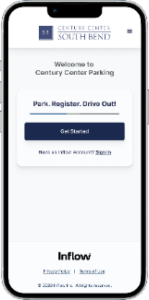
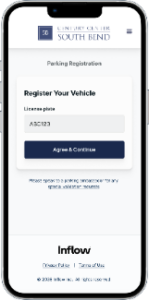
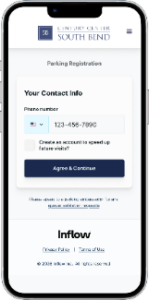
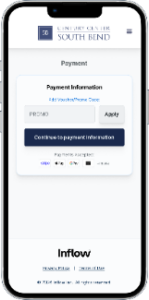
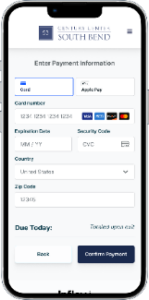
Unable to scan a QR Code or don’t have a smartphone? Call (574) 850-5410 for parking assistance complete your transaction. See below for parking lot policies and additional information.
Exiting the Parking Lot
Registered Vehicles – Fast Exit Payment Processing
- Drive to the exit lanes
- If you are registered, payment is processed automatically, and the gate opens. Simply drive out!
Unregistered Vehicles – Payment Options
- Scan QR code on screen at exit to process payment, or
- Press Assistance Button for remote support and additional payment options
Parking Rates
Regular Hourly Rates
0-30 min: Free
30 min-2 Hours: $2.00
2-3 Hours: $4.00
3-5 Hours: $6.00
5-24 Hours: $10.00
Special Event Parking Rates
Variable Special Event Parking rates will be posted and will remain in effect for 24 hours following the special event start time, after which regular hourly rates will resume.
Electric Vehicle Charging Fees Begin November 1, 2026
Beginning November 1, 2026, fees will go into effect for City-owned electric vehicle (EV) charging stations.
EV Charging Rates
- First 2 hours: Free
- After the first 2 hours: $3 per hour
How to Use the Charging Stations
A compatible mobile app is required to initiate a charging session.
The City Hall Parking Garage is equipped with FLO electric vehicle charging stations. Drivers can use the FLO app to access the charging stations and begin a charging session.
Download the FLO App
Choose the appropriate link for your mobile device:
Questions or Need to Report an Issue?
To learn more about City-owned electric vehicle charging stations or to report an issue, please visit the City of South Bend 311 Service Portal.
FAQs
How do I scan the QR code?
To scan a QR code, simply open your phone’s camera app and point it at the QR code. The camera automatically detects and decodes the QR code, displaying the associated information or link. You may need to tap a notification that appears on your screen to open the associated link.
- Apple Support: Scan a QR code with you iPhone or iPad
- Google Help: Scan QR code on Camera from Google
What if I can’t scan the QR Code?
If you’re unable to scan the QR code to pay for parking, you can use our convenient Text-to-Pay option by texting the location code IT1500 to 94201 as posted on the lot signage. Need assistance, call 574-850-5410.
What payment methods do you accept?
The following payments are accepted: Apple Pay, Google Pay, or credit card. Need assistance with payment or registration? Call 574-850-5410.
I have a delivery, do I need to pay?
Any parking sessions under the 30 minute grace period are complimentary. If you are in the lot over that period of time, you will need to pay the hourly rates or receive a parking validation.
How do I apply a promo code to my parking session?
Promo codes are applied on the payment screen during vehicle registration. Click on the Add Voucher/Promo Code link to apply to your session.
Parking Information & Policies
- Parking lot hours are 24 hours per day. All vehicles entering are subject to hourly rates as posted, unless special event pricing is in effect.
- Don’t Forget to Register license plate for parking once you have parked your vehicle.
- There is a grace period for convenience of up to 30 minutes at no charge for deliveries and drop-offs. Any vehicle in the parking lot that exceeds the grace period will be required to register and pay the hourly rates posted.
- Click on the links to view our Privacy Policy and Security.
- All rules are subject to change at the Century Center sole discretion without notice.
Parking Support
For questions or assistance related to parking, please call 574-235-9196.
What to do if the Century Center parking lot is full or unavailable?
There are also more than 2,000 spaces available within a two-block radius of the Century Center. There is a main entrance drop off and pickup area, as well as a service entrance for loading and unloading near the back of the parking lot.
Please click the link below to view additional parking options.